Showing posts with label Iphone. Show all posts

Sunday, 6 March 2016

How To JailBreak Iphone 4s,5,5s,5c (IOS 8)

Hello Readers My Name is Shanzay Khan & Today I Am Going TO Show You How To JailBreak Iphone 4s,5,5s,5c (IOS 8)
How To JailBreak Iphone 4s,5,5s,5c (IOS 8)

We Have Talked About Jailbreak What Is Jailbreak? What its Purpose in Previous Post So In This we Will Skip Wasting Time In Explaining Jailbrak & Will Start the Work
Lets Start:)
We Will Use Pangu For Jailbreaking Ios 8
Note: Make Sure You Have Already Backed Up Your Device
  • First Of All Go To Settings Disable Passcode Or Touch id Option & Turn Off Turn My Iphone Option Or Other-Wise jailBreak Will Fail 
  • First of All Download the Latest Version of Pangu For Mac Or windows
  • Link For Download Pangu For MAC:
    https://mega.nz/#!iZsWwSab!wHL63_4W3jqSHd0A9E63FjQ5DFiKv9yIczJFwFTzckw
  • Link For Download Pangu For WINDOWS:
    https://mega.nz/#!jdV0XLLC!q5usgz31WIuDq7K2M7F4zpXWzDQOgsLrY8Qz2LbfuLU
  • Then Install it After Installation Open Pangu & Wi8 For its Intillazition
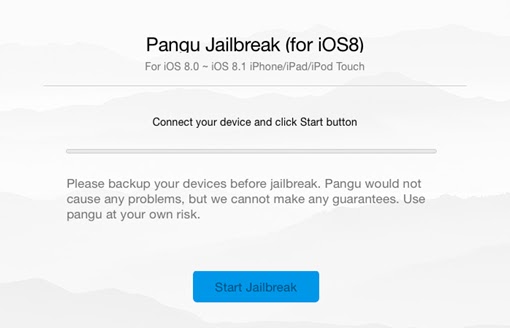
  • Then You will See This Window on Pangu:
How To JailBreak Iphone 4s,5,5s,5c (IOS 8)
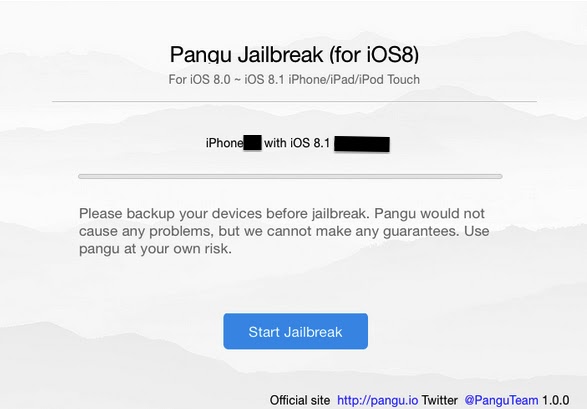
  • Now Connect YOur Iphone To Your PC 
How To JailBreak Iphone 4s,5,5s,5c (IOS 8)
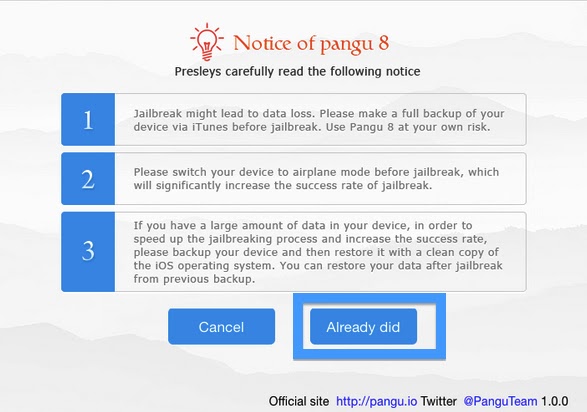
  • After Pangu Detects Your Iphone Click On Start JailBreak Then It Will Ask You For Confirmation Of Backup If You Have Already Backed Up Your Iphone Then Click Already Did 
How To JailBreak Iphone 4s,5,5s,5c (IOS 8)

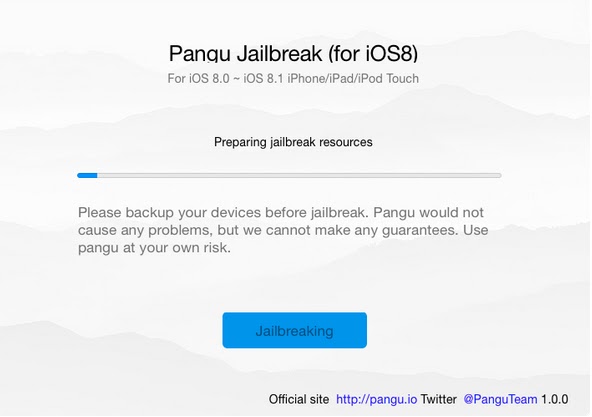
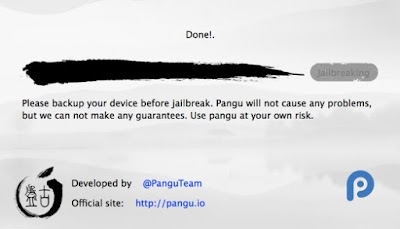
  •  Then Pangu Will Start Jailbreaking
How To JailBreak Iphone 4s,5,5s,5c (IOS 8)
As Jailbreak Completes It Will Notify You With Done Option & You Will Find the Latest Version Of Cydia On Your Device
Done you Have Successfully Jailbroken Your Device 
Enjoy & Keep Visiting MuZaMIlTriCks.COm

Saturday, 5 March 2016

How To JailBreak Iphone 4,4s, 5, 5s,5c (Ios 7)


Hello Readers my name is Shanzay khan & Today I Am Going To Show You How TO JailBreak Iphone 4,4s 5 5s,(Ios 7,)


How TO JailBreak Iphone 4,4s 5 5s,(Ios 7,)


So Lets Start ; 

What is Jailbreak You Can Google It For More Brief in Simple Words JailBreak Mean Getting the Root Of Your IDevice Like Wo Do In Android By Rooting It.
By Jailbreaking Your IDevice You Can Install Additional Apps Useful Extension & Download Anything That's The Apple App Store Does Not Allow Or Provide For Your Idevice
JailBreaking is the Process of Removing the Restrictions Of Apple From Your Idevice
  • So Now You Know About Jailbreaking then Lets Start The Work;-)
  • First of the the things you will need to jailbreak your iphone is 
  • A Computer Doesn't Matter its Window's Or Mac
  • A Usb Or Lightning Cable To connect your iphone to PC
  • A Software Called Pangu Offical Ios 7 Jailbreaker Installed On Your Computer
  • Link TO Download Pangu For WINDOWS:
    https://mega.nz/#!7N9wEIqT!G6MFGHk9hGEDpsCQfJlr6uRlJxXxmBFJsfpgtjWjsf0 
    • Link TO Download Pangu For WINDOWS:

    https://mega.nz/#!iZsWwSab!wHL63_4W3jqSHd0A9E63FjQ5DFiKv9yIczJFwFTzckw
     
  • Itunes Installed on your PC
If you have these things then you are good to go 
First of all connect your iphone with the PC & wi8 for the itunes to open & detect the Iphone  
Once iphone is detected Close the Itunes & Also  from the task manager.
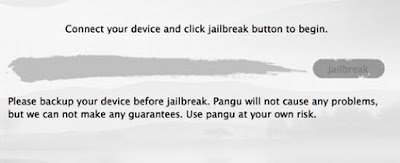
  • Then Open The Pangu & Wi8 For It Until You Came To This Window On Pangu
How TO JailBreak Iphone 4,4s 5 5s,(Ios 7,)
 
  • Connect your iphone to your computer & Click Jailbreak
How TO JailBreak Iphone 4,4s 5 5s,(Ios 7,)


  • Then You Will See a POP Up On Your iphone screen asking you To
  • Set Your Device to 2 JUNE 2014
How TO JailBreak Iphone 4,4s 5 5s,(Ios 7,)
  • If You Adjusted Your Iphone Date Correctly You Will be Promoted To This Screen on pangu
How TO JailBreak Iphone 4,4s 5 5s,(Ios 7,)

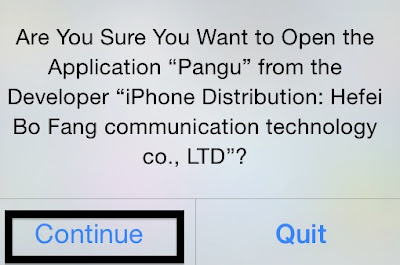
  • As Soon The Injecting Process Starts Iphone Will Pop up with this Screen Click On Continue
How TO JailBreak Iphone 4,4s 5 5s,(Ios 7,)

  • Then The Jailbreaking Process Will Start Wi8 Fro it To Complete
How TO JailBreak Iphone 4,4s 5 5s,(Ios 7,)
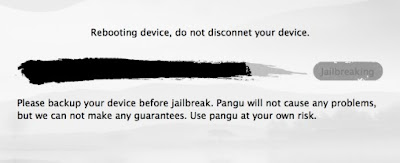
  • As Soon The Process Completes It Will Reboot Your Iphone During Reboot Do not Disconnect your iphone From PC
How TO JailBreak Iphone 4,4s 5 5s,(Ios 7,)


As The Reboot Complete Pangu Will Detect your device & will show you a MSG Done Now You Can unplug Your Device From PC
How TO JailBreak Iphone 4,4s 5 5s,(Ios 7,)
Now Your Iphone Has Been Successfully JailBroken 
Done Enjoy & Keep Visiting MuzamilTRicKs.CoM


Sunday, 7 February 2016

How to Put Your iPhone into DFU Mode & in RECOVERY Mode in Simplest Steps

Hello users
My name is SHANZAY KHAN & today i am going you to show u how to put your iPhone into DFU mode & in RECOVERY mode in simplest steps
How to Put Your iPhone into DFU Mode & in RECOVERY Mode in Simplest Steps


Lots of people have problem with DFU MODE because in DFU mode

ACCORDING to software you have to turn your device off .
then press then power button for 3 seconds
then press home button too for 10 seconds but don't leave the power button
then after ten seconds leave the power button but keep holding the home button its too complicated

I suggest u the simplest method which is:

Press The HOME & The POWER Buttons Togather Until The Phone Gets Off the After 3 Sec Realse The Power Button But Keep Holding The HOme Button For MAXIMUM 10 sec DONE

u R iN DfU MoDE NoW U CaN rESTOre ThE EDITED IPSW ON IPHONE USING ITUNEs
For Recvory simply download the software from the link & open it.
www.RecBoot.com/Downloads.
Enjoy!
Keep Visiting #MUZAMILTRICKS.COM

Thursday, 28 January 2016

How To Set Up Bluetooth To Your iPhone Through Your Car

Set Up Bluetooth To Your iPhone Through Your Car

Hello Readers my name is Muzamil Hussain.Today i,m Going to Tell You How To Set Up Bluetooth To Your iPhone Through Your Car. According to state law, as of Gregorian calendar month 2008, you want to have a hands free device or Bluetooth for talking on your telephone whereas driving a automotive. as luck would have it technology has well-kept with the days for vehicles that enable you to own a Bluetooth return through your automotive radio. This tip can assist you perceive however easy and simple it's to line up a Bluetooth to your iPhone through your automotive. First, you want to be within your automotive for the association between your iPhone’s Bluetooth and also the automotive to occur. you'll definitely activate Bluetooth mode on your iPhone whereas sitting in your lounge, however it’s not progressing to connect unless you're really within the automotive. there's solely a particular vary that Bluetooth will connect with associate degree iPhone with and it wouldn't be for you to own iPhone connected to Bluetooth if you're sitting within the tub.

How To Set Up Bluetooth To Your iPhone Through Your Car

So once you're within your automotive, begin by sound your settings app on your iPhone. Since you wish to line up a Bluetooth to your iPhone through your automotive, you're progressing to would like the automotive turned on and also the radio turned on. Once within your settings app, click the tab that says General. you'll then see another tab that says Bluetooth. Since this can be your initial time doing this, and you're within the tip on a way to started a Bluetooth to your iPhone through your automotive, the Bluetooth choice can mechanically
be on off. Click the Bluetooth tab, and initial switch it to on mode. you'll See an alternative choice to feature a tool. Device during this instance is touching on the particular automotive or automobile. currently on your automotive radio (if you would like to see your owner’s manual since all cars steps vary) please do therefore at now therefore you recognize what button on the radio to push. Since there square measure several makes and models of cars out there today, every automotive can have their own specific button on the automotive radio to push.
The button choices square measure usually: choose (meaning to pick out the phone device it's studying (through airwaves and sound waves), try (because you'll link over one phone to your automotive -for example if you share the automotive together with your husband and you've got your iPhone joined to the automotive for Bluetooth, therefore will he link his iPhone to the car’s Bluetooth). Since you're putting in the Bluetooth to your iPhone for the primary time through your automotive, {you can|you'll|you may} click choose and also the show on the automotive radio will provide a phone that it picks up. after you see your name id est. Sally’s iPhone or iPhone, opt for the one that applies to you. it'll begin looking for the particular association. you're basically doing the automotive radio setting and also the iPhone setting at identical time. therefore currently if you look on your iPhone, you'll see the Devices box, looking out and it'll say ‘now discoverable’. somewhat sand glass circle can go around till it connects and each the iPhone and also the automotive can say connected.
If you click the insufficient blue triangle on the device tab, you'll see one more tiny menu that asks you if you wish to synchronize contacts, phone favourites, and phone recent. confirm they're all switched to ON because the automotive can connect with your iPhone however if you've got these off it'll not be ready to transfer your contacts. As long as you've got these switched to on, once the association is complete, the automotive can say downloading contacts -which is wherever it's studying the contact list on your iPhone. this can be however you'll be ready to verbally speak aloud into the automotive to dial a particular person or phone number whereas driving hands free.
To turn off the Bluetooth (especially since it wastes a ton of battery when you’re not driving in the car) simply go back to settings, general tab, Bluetooth tab and click the off button. It will automatically stop searching for a connection. Good Luck & Enjoy :)
If you Like this Article So Share your,s Friends and tell About our site,If you have any problem so contact us Feel Free Thanks.

www.MuzamilTricks.com

Sunday, 20 December 2015

Apple iphone 6s Price in Pakistan

Apple iphone 6s Price in Pakistan


Apple iphone 6s Price in Pakistan

Hello Readers my name is Muzamil Hussain.Today i,m Going to Tell You Apple iphone 6s Price in Pakistan. On your imprints, prepared unfaltering go! Coming to you the fall of 2015, the new Apple iPhone 6S is going to get the greatest equipment overhaul of all "Apple S" renditions. More speed, more memory, another screen and a superior camera. The most recent variant of the ancestor is currently called Apple's cutting edge iPhone, which is by a wide margin the best. 6s is reputed to be in development stages with the greatest pace help. the incorporated processor of Apple iPhone's 6s would be an A9 CPU made by Samsung, the centers are still obscure however as indicated by Bloomberg it is delivered utilizing the 14nm procedure. Likewise, another new and most invited upgrade is that iPhone 6s will have two gigabyte of RAM rather than only one. Apple A9 chipset alongside 2GB of RAM will help all the application addicts, Apple iphone 6s' reserve thus, would be essentially less compelled to close applications out of sight and to restart later, on the off chance that we need to utilize them once more. Since Many "S" adaptations of Apple that we have seen and experienced before, the iphone 6s have brought a more noteworthy advancement that will alter the cell phones betterly. "Reformed" as in Apple's rivals will think of it as a smart thought and will unquestionably add to their own particular varieties thereof. as a sample, one can allude to the advancements prior to the Apple iPhone 6s, as Siri voice control, Bluetooth 4.0 and the unique finger impression sensor transformation. Outfitted with Force Touch, weight delicate innovation, the showcase can gauge how hard we press which brings about distinctive capacities.


Dimension 138.1 x 67 x 6.9 mm

 Weight 143 g

 Battery Stand-by up to 240 hrs, Talk-time up to 14 hrs, Music-Play up to 50 hrs
1715 mAh

 OS iOS 9

 Memory 16/64/128GB built-in, 2GB RAM

 Processor Apple A9

Connectivity Bluetooth v4.1 with A2DP, LE, USB (v2.0, reversible connector), WLAN (Wi-Fi 802.11 a/b/g/n/ac, dual-band, hotspot), NFC (Apple Pay only), GPRS, EDGE, 3G (HSPA 42.2/5.76 Mbps, 4G LTE Cat6 300/50 Mbps, EV-DO Rev.A 3.1 Mbps

Display Size 4.7 inches , 750 x 1334 pixels (~326 ppi pixel density)

Sensors: Accelerometer, gyro, proximity, compass, barometer

Display Colour LED-backlit IPS LCD, capacitive touchscreen, 16M colors, Multitouch, Ion-strengthened glass, oleophobic coating, 3D Touch display, Display Zoom


 Operating Frequency / Band GSM 850 / 900 / 1800 / 1900

 3G Band HSDPA 850 / 900 / 1700 / 1900 / 2100

 4G Band LTE band 1(2100), 2(1900), 3(1800), 4(1700/2100), 5(850), 7(2600), 8(900), 12(700), 13(700), 17(700), 18(800), 19(800), 20(800), 25(1900), 26(850), 28(700), 29(700)

 Browser HTML5 (Safari)

 Colors Space Gray, Silver, Gold, Rose Gold

 Entertainment Audio/video player and editor, 3.5mm audio jack, TV-out, iCloud cloud service, iCloud Keychain, Image editor, Games (built-in + downloadable)

 Camera 12 MP, 4608 x 2592 pixels, phase detection autofocus, dual-LED (dual tone) flash, Geo-tagging, simultaneous HD video and image recording, touch focus, face/smile detection, HDR (photo/panorama), Video 1080p@60fps, 720p@240fps, 2ndry 5 MP, 720p@30fps, face detection, HDR, panorama

 Other Features GPS + A-GPS support and GLONASS, Nano-SIM card support only, Active noise cancellation with dedicated mic, Siri natural language commands and dictation, Organizer, Google Maps, Document editor, Fingerprint sensor (Touch ID), Apple Pay (Visa, MasterCard, AMEX certified), Photo/video editor, Speakerphone

 Ring Tones Vibration, proprietary ringtones

 Messaging iMessage, SMS (threaded view), MMS, Email, Push Email

Price Price in Rs: 76,000    Price in USD: $774


If you Like this Article Soo Share your,s Friends and tell About our site,If you have any problem soo contect us Feel Free Thanx.

www.MuzamilTricks.com