Showing posts with label Download. Show all posts

Friday, 13 May 2016

How To Download Facebook Videos Directly Without Using Any Video Downloader

Hello Reader My Name Is Shanzay Khan & Today I Am Going To Show You How To Download Facebook Videos Directly Without Using Any Video Downloader
So Lets Start:
How To Download Facebook Videos Directly Without Using Any Video Downloader


  • First of All Open The Video On Facebook Which you want to Download
  • Lets Suppose This Is The Video I Want To Download:
How To Download Facebook Videos Directly Without Using Any Video Downloader (Muzamiltricks.com)


  • Then If Video Is In Seperate Tab Then Its Simple Or Other Wise Left click on the video & Select Show Video URL Copy That URL & Paste It In The New Tab Before Pressing Enter You Have To Make Some Changes In That URL
  • You Have To Change www.facebook To m.facebook 

Like This (This Link is Fake Used For Learning Purpose)

www.facebook.com/MuzamiltricksBlog-Video

m.facebook.com/MuzamiltricksBlog-Video    OR
Follow the ScreenSHots:
How To Download Facebook Videos Directly Without Using Any Video Downloader (Muzamiltricks.com)
 
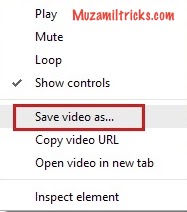
  • By Doing this Facebook will Be Change To Mobile Format & You Will Be Able to Download Your Video Easily By Right Click On Video & Selecting Save Video As
 
How To Download Facebook Videos Directly Without Using Any Video Downloader (Muzamiltricks.com)

Hope You like It Enjoy & Keep Visiting MuzaMilTricKs.COm
Follow Me On Social Media
#Shanzay Khan
FaceBook
TwitTer

Tuesday, 8 December 2015

How to Make Personal Bot Site By Downloading Bot Script Free

Hello Readers My Name is Arslan Ahmed Awan. Today I am Going to tell you about How to Make

Personal Bot Site By Downloading Bot Script Free.

Bot Script is a program in demotic language which collection involuntary comments to your friends collection and provide port to your BOT place. There are distinct and some bot play script which install comments and engage disparate person programmer lay out.


There are 2 Files of bot script Download from below, First index file is for layout of your site and second value file is to post comments.

Upload these 2 file to your hosting site and also upload picture along these files. Activate your Bot & Enjoy Stylish Comments.

Bot Scipt Download Link
www.mediafire.com/download/d8cfho3d2i2cldr/Bot+Site+Script.rar

If you find any error in doing it , then let me know by Commenting under this post.

www.MuzamilTricks.com


Friday, 4 December 2015

How to Resume Broken Download In IDM Or Any Other Downloader


Hello Readers My Name is Arslan Ahmed Awan. Today I am Going to tell you about How to

 Resume Broken Download In IDM Or Any Other Downloaders.

Everybody like IDM and there are more than enough reasons for it. But the thing that always bother us is a broken download that can't be resumed. You are downloading a file, reached 80% point, something happens and downloading stops.

When you try to resume it to receive this message. So will you start the downloading from the beginning or just quit it and face the reality? I know both the options are heartbreaking. So today I am going to show you how you can resume the broken download in IDM.

Alright! Lets Begin.

For Video File

Whenever a video is detected on a page, IDM will give you an option to download this video. When you click on the IDM button, the video will start downloading, simple enough. But sometimes you will notice that the video doesn't have the "resume capability"


and once the downloading stops and you try to resume the video, it will ask you to download the file from beginning. So in this case,

Step 1 : Stop (cancel) the downloading and go to main IDM window.

Step 2 : Right click on the video and select properties.


Step 3 : Notice the address part. Most of the videos will have a similar link.


Step 4 : Simply remove the "?start=0" from the end and press OK.


Step 1 : Now click on resume button. Your file will start to download again and you will see that it have the resume capability now.


For Other Files

This method is a bit different from the video method however you can use it to resume the videos as well. All you need is to keep the link (web address) from where you are downloading.

Step 1 : Download the file until it stops. Don't remove it.

Step 2 : Go to browser and open the web page again from where you were downloading the file.

Step 3 : Click on the download button on the page, but this time when IDM appears, click on download later.


Step 4 : Go to the main IDM window and open the properties of the file you have added to download later. Copy its download location.

Step 5 : Now open the properties of the file that just stopped downloading. Paste the address here.

Step 6 : Now try to resume the file. In most cases it will work.

And that is how you avoid downloading the file from the beginning.