


Hello Readers my name is Shanzay khan & today i am going to show you How To Configure PTCL Modem Settings.
Lets Start;

Lets Start;

- First of all make sure that DSL light on your Router is stable (dont worry about Internet light)
- Then Open your browser & Type the IP Adress Of your router which is 192.168.1.1 & In Some new Model it is 192.168.10.1 & hit Enter
- After That it will ask you the Username & Password
- Type as it is Written Below
- Username ; Admin
- Password ; Admin (in mostly Modems it is admin or you can chk your on the back of your router named with admin passward)
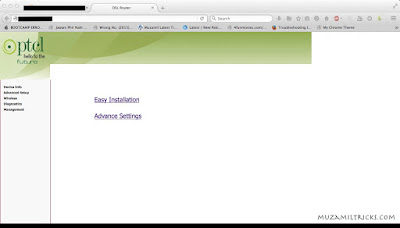
- Now You Will See the Page Like this
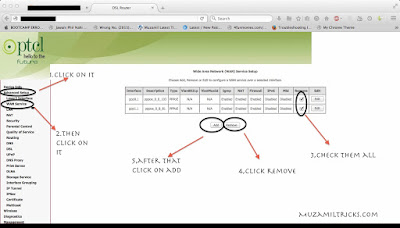
- On the Left side of the image you will see Advance setup click On It
- Then Click On The WAN
- Then You Will See the Tables on that page Selected them all and click remove
- then click Add & then Scroll down the page click Next
- Follow the Screenshots Below;
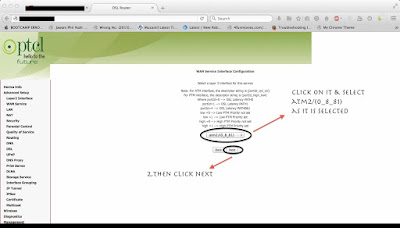
- Then After Clicking on Add You Will See The page Like This Do as is It is Shown On The Screenshots Below;
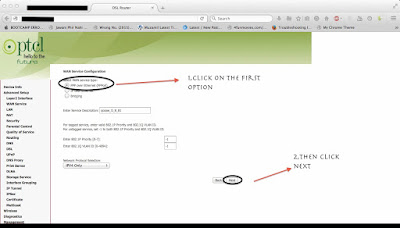
- After Clicking Next You will See The page like This do As It Is shown in The Screenshots Below;
- Then The Page Will Look Like This Do as It Is Shown Below in the Screenshots;
- Note Leave The Provider Name Blank & Password is (1234 or 1122 or 12356,ptcl,PTCL1234)
- Then Scroll down Down the page & click next then on the next page click next ,click next next until it comes with page Apply & save
- Click on the Apply & save then restart the Modem wi8 for complete Restart

Done Your Internet should be working Properly
Enjoy & Keep Visiting Muzamiltricks.com


